Note
Go to the end to download the full example code.
Automatic sample construction (dispatcher).
You typically don’t want to care about the concrete sample type. probly provides
create_sample which selects the best representation based on the sample element type.
For example:
lists of NumPy arrays become an
ArraySamplelists of Python scalars become an
ArraySampleother objects fall back to
ListSample
This example also renders a tiny plot to show the average class probabilities for the first instance in the sample (just to make sure gallery execution is visibly working).
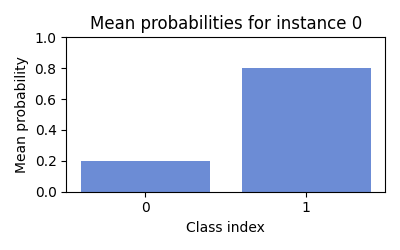
sample type: ArraySample
mean:
 [[0.2 0.8]
 [0.7 0.3]]
from __future__ import annotations

import matplotlib.pyplot as plt
import numpy as np

from probly.representation.sampling.sample import create_sample

samples = [
    np.array([[0.2, 0.8], [0.7, 0.3]]),
    np.array([[0.1, 0.9], [0.6, 0.4]]),
    np.array([[0.3, 0.7], [0.8, 0.2]]),
]

sample = create_sample(samples)

print("sample type:", type(sample).__name__)

mean = np.mean(samples, axis=0)
print("mean:\n", mean)

# Visualize the mean probabilities for the first instance.
classes = np.arange(mean.shape[1])
plt.figure(figsize=(4, 2.5))
plt.bar(classes, mean[0], color="#6c8cd5")
plt.xticks(classes)
plt.ylim(0, 1)
plt.xlabel("Class index")
plt.ylabel("Mean probability")
plt.title("Mean probabilities for instance 0")
plt.tight_layout()
plt.show()
Total running time of the script: (0 minutes 0.052 seconds)